Jumat, 17 Februari 2017

LG Mobile McAfee FRP lock after reset

How to remove LG mobile p3 McAfee FRP

LG Mobile McAfee FRP lock after reset

In LG mobile phone McAfee security is built in.This is good thing but become headache when we reset mobile phone or flash it.It is like FRP but is same for all phones.Just you have to enter 123456 default pin to unlock.Enjoy with LG mobile P3 double tap lock and unlock.

Fastboot & Recovery Mode for LG Phones

LG is not much friendly for entering fastboot with the key-combination and hence, will have to be done by connecting to a pc and hence it is not covered in this guide. There are some exclusions though. Booting to recovery with key-combinations is just fine.

For All Devices that do not Support Fastboot Key Combination

To enter  into Recovery: (while turned off) Press and hold  Volume Down + Power

Exclusions:

Nexus 4
To enter  into Bootloader/Fastboot : (while turned off) Press and hold  Volume Down + Power
To enter  into Recovery: (while turned off) Press and hold  Volume Down + Power then scroll down to Recovery Mode with the Volume Keys and select with the Power key.

LG Optimus One P500 and Optimus Net P690
To enter  into  Fastboot : (while turned off) Press and hold  Home + Power
To enter  into Recovery: (while turned off) Press and hold Volume Down + Home + Power

LG Optimus Me P350
To enter  into  Fastboot : (while turned off) Press and hold  Volume Up + Call key+ Power
To enter  into Recovery: (while turned off) Press and hold Volume Down + Call key + Power

LG Optimus GT540
To enter  into  Fastboot : (while turned off) Press and hold  Camera + Power
To enter  into Recovery: (while turned off) Press and hold  Home + Power

LG Optimus L3
To enter  into Recovery: (while turned off) Press and hold  Volume Down + Menu button + Power

LG Optimus L3
To enter  into Recovery: (while turned off) Press and hold  Volume Down + Power and immediately followed by pressing and holding Home key.

LG Optimus G
To enter  into Bootloader/Fastboot : (while turned off) Press and hold  Volume Down + Power
To enter  into Recovery: (while turned off) Press and hold  Volume Down + Power then scroll down to Recovery Mode with the Volume Keys and select with the Power key.


TAGS:McAfee FRP removed,lg p3 McAfee pin,McAfee defualt pin,Nexus 4 Recovery and Fastboot,LG Optimus One P500 Recovery and Fastboot,Optimus Net P690 Recovery and Fastboot,LG Optimus Me P350 Recovery and Fastboot,LG Optimus GT540 Recovery and Fastboot,LG Optimus GT540 Recovery and Fastboot,LG Optimus L3 Recovery and Fastboot,LG Optimus L3 Recovery and Fastboot,LG Optimus G Recovery and Fastboot.

Huawei Mobile P8 Lite corrupt via WIFI

All Huawei phones corrupt during update via wifi.

All Huawei phones corrupt during update via wifi.


 Auto update latest version via WIFI is built in function in almost all smartphones.If wifi signal low or stop for a moment process will stop and the result,
Mobile phone bricked.
Start up failed.
Some applications stopped.
May some process unable to run and/or stopped.
Showing "unfortunately process has stopped".
   In Huawei smartphones after updating when restart mobile, updates start applying in circle from Zero and stop at less then 100%. It means update process is incomplete files are missing cause errors given above.
  If you are facing such issue with huawei p8 lite or other phone don't flash it.Just you have to Wipe data and cache from Recovery.Recovery Mode of P8 lite is different but,exist.To go into recovery mode,

Power off phone.
Press Vol up+Vol down+Power keys.
When Logo show release only power key and suddenly press again until recovery appeared.
Scroll down with Vol Down key and Select with power key.
Wipe user data and cache respectivly.
Restart phone and complete Start up Wizard.

All data will be deleted! Be sure to backup your data before doing a factore reset / wiping your data.

Huawei Phones Fastboot

To enter fastboot mode for:

Huawei U8150, U8220, U8230
Turn off the phone. Press "Power" button shorly. Then press "Vol -", "Red (End call)" and Power buttons.
Hold the buttons pressed until your phone completely hangs. This will enter to fastboot mode.
Then connect your phone to computer and follow the rest of instructions.

Huawei U8160
Turn off the phone. Press "Power" button shortly. Then press and hold "Vol -" and "Power" buttons.
Hold both buttons pressed till sandclock appears on your phone screen (and the phone completely hangs).
This will enter to fastboot mode. Then connect your phone to computer and follow the rest of instructions.

Huawei U8180
Turn off the phone. Then press Power shortly. Then press and hold "Vol -", "Menu" and "Power" buttons
till sandclock appears on your phone screen (and the phone completely hangs). This will enter to fastboot mode.
Then connect your phone to computer and follow the rest of instructions.

Huawei U8350
Turn off the phone. Remove battery and hold it removed for 15 seconds. Then place it back to the phone.
Press "Power" shortly. Then press and hold "Vol -", "Red (End call)" and "Power" buttons until your phone completely hangs.
This will enter to fastboot mode. Then connect your phone to computer and follow the rest of instructions.

Huawei U8500
Turn off the phone. Then press "Power" button shortly. Press and hold "Vol -", "Red (End call)" and "Power" buttons
till your phone completely hangs. This will enter to fastboot mode.
Then connect your phone to computer and follow the rest of instructions.

Huawei U8650
Turn off the phone. Remove battery and hold it removed for 10 secods. Then place it back to the phne.
Press and hold "Vol -" and "Power" buttons. Hold both buttons pressed till your phone completely hangs.
This will enter to fastboot mode. Then connect your phone to computer and follow the rest of instructions.

Huawei U8510
Turn off the phone. Remove battery and hold it removed for 10 secods. Then place it back to the phne.
Press and hold "Vol -" and "Power" buttons. Hold both buttons pressed till your phone completely hangs.
This will enter to fastboot mode. Then connect your phone to computer and follow the rest of instructions.

TAGS:P8 lite,Huawei P8 lite,Huawei P8 lite hang on logo,Huawei P8 lite hang on process,Huawei P8 lite keyboard not working,Huawei P8 lite not accept PIN,Huawei P8 lite bricked,Huawei P8 lite hard reset,Huawei P8 lite Recovery mode,Huawei P8 lite stop working,Huawei P8 lite,Huawei P8 lite wipe data,Huawei P8 lite update,Huawei P8 lite updating failed via wifi,start up failed,P8 lite some applications stopped,P8 lite some process unable to run and/or stopped,P8 lite showing "unfortunately process has stopped"

Minggu, 12 Februari 2017

Windows Tips and Tricks

At this place you'll be know:

1:VLC shows green bar on video in old PCs
2: System cannot Run games after installing new Windows.
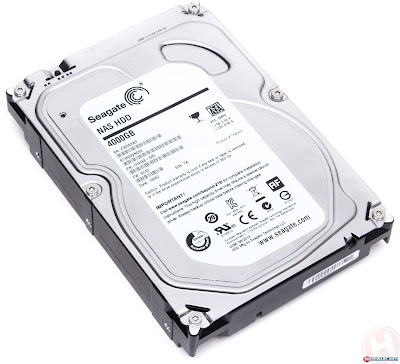
3:Hard Disk not show but detected

VLC shows green bar on video in old PCs

Windows Tips and Tricks

This problem mostly appears on old Dell systems. People think that this is drivers problem but is codec problem.It shows a green bar on screen on VLC , KM Player even Window Media Player.

Solutions:

Solution of this problem is to download and install K-Lite Media Player which has essential codecs.

System cannot Run games after installing new Windows.

System cannot Run games after installing new Windows

System cannot Run games after installing new Windows. This problem mostly seen on old model computers and appears after installing a new copy of windows. We think it is hardware like Hard Disk , RAM or Mother Board problem. But it is not true and just drivers problem.

 Solution:

solution


Only update marked drivers from Softmedia or DriverPack Solution DVD.

Hard Disk not show but detected


Hard Disk not show but detected


Hard Disk not show but detected device manager.Just wash its board with any dust remover liquid dry it carefully.

Kamis, 19 Januari 2017

Optimize Windows 7 for faster performance

Your system is running slow. Opening two or more programs at same time hang up or showing program is not responding and may be unable to run a heavy software like android studio.it's mean performance is less.You are professional and want more speed on windows 7.Then you have to make it light and have to close all tasks those are unnecessary and making windows loaded result slow. Appearance is one thing such as display,folders ,explorer transparency and round corners and much more and called visual effects. For best performance follow these steps.
 1:Click on start menu.

 Optimize Windows 7 for faster performance


2:Type performance in search and click on adjust the appearance and performance of windows.
3:Performance option will be open.

speed up win 7


4:Select Adjust for best performance

slow windows 7

5:Apply and OK

You have have done.Now check speed and try to install or run any heavy software.
Facing same issue resolve followings From Microsoft recommendation
Defragment of hard diskClean up your hard disk
Run fewer programs at the same timeAdd more memoryCheck for viruses and spywareCheck your computer's speedChange the size of virtual memory


Sabtu, 14 Januari 2017

Adsense Approvel on Blogger Blog with Proof

Adsense Approvel for Blog

People made Bloggers hopeless that Adsense can not be approved for Blog. And have a top level Domain for this. And have posts with hundreds of words and bla bla bla.......

But I have done and get fully approved Adsense Account on my this blog URL itsolpak.blogspot.com on 12 Jan 2017.People just say , write or make video tutorial and don't show original things but I am showing all my stuff given image is my confirmation email sent by google.

Adsense Approvel Mail

In Adsense manage sites , every one can see my blog url. There is no Top Level Domain .com , .net , .org or other.

Blog URL in Adsense

These are not only Urls but verified sites.

Verified Sites in Adsense

And finally , my Adsense Earnings page and newest account's earnings .

Adsense Earnings for Blogger

Youtube Tutorial

Youtube Link

google adsense approval on Blogger 2017,adsense, google adsense, adsense login, google adsenselogin,adsense google, google adverts, make money with google, make money online withgoogle, adsense sign up, adsense account, adsense sign in, google adsense sign up, earn money with google, blogger adsense, google adsense sign in, adsense earnings, what is google adsense, google adsense earnings, adsense blogger, google adsense account, make money with adsense, adsense youtube, adsense payment, google adsense com, youtube adsense, google ads login, buy adsense account, what is adsense,make money with google adsense, adsense revenue, google adsense revenue, google adsense youtube, earn money from google, adsense approval, google adsense blogger, login google adsense, create adsense account, google adsense login account, make money from google, earn from google, blogger com adsense,google adsense income, adsense policy, adsense google ads, blogger google adsense,online money earning by google, adsense earning, adsense website, adsense login account, google earn money, adsense ads, earn with google, adsense support, create google adsense account, adsense mobile, earn money online, adsense code, make money on google, adsense account login, adsense google login, adsense traffic, google adsense website, adsense money, adsense income, google earning ,google adsense money, google adsense rules, ads for blogger, google adsense code, my adsense account, sign up for adsense, make money with google ads, make money with adsense without a website, make money from google ads, earn from google adsense, google adsense approval, monetize website without adsense, adsense account sign up, apply for adsense, sign in google ads, earn through google, google ads for website, sign up adsense, how to earn money online with google, how to blog for money, google ads blog, google adsense earning
google adsense 2017 apply for google adsense, adsense rules, google adsense make money, sign up google adsense, earn money with google adsense, make money adsense, earn money through google, google ads website, make money blogging ,adsense guide, google adsense review, blog with adsense,google adsense account login, google ad on, earn money from google adsense, google ads on my website, how to make money from google, create adsense account without website, good adsense, google adsense create account, adsense advertising, google ads for my website, make money google adsense, made for adsense, how google adsense works, how to make money blogging, buy adsense website, adsense id, google ads earn money, adsense account sign in, google adsense forum, how to create a blog and earn money, how to make money from a blog, about google adsense, i want to earn money from google, adsense for mobile, google adsense login only, adsense for content, google blogger make money, youtube google adsense ,google adsense account create, what is adsense account ,google adsense guide ,adsense alternatives ,adsense account create ,blog for money, make money online advertising google, google adsense register, earn with google adsense how to make money with google, how to get adsense account, adsense com sign up ,how to earn money from google, how adsense works ,google adsense sign in account, make money from adsense, adsense google registration ,google adsense publisher ,google adsense for blogger ,how to get google adsense account, adsense cpm, advertise on adsense ,blogger ads, adsense for search ,make money google advertising ,make money from google adsense, adsense sign up blogger, youtube adsense login, ads for blogger other than adsense, earn money with adsense, adsense make money ,create an adsense account, blog advertising, adsense in blogger ,free google ads, google blogger adsense, blogger and adsense, google ads sign up ,earn with google adsense without site, adsense program, adsense register ,blogger adsense sign up, google ads earning ,earn by google adsense, google ads money, adsense com sign in, adsense approval time ,adsense create account ,earn with adsense ,google adsense india, google ads make money, create google adsense account without website, adsense application, get google ads on my website ,adsense account approval ,adsense optimization ,how to earn money by blogging, making money from a blog ,make money google ads google adsense tips ,blog ads, monetize blogger without adsense, blogger adsense approval, adsense for website, sign up adsense blogger, earn money from google ads, google adsense jobs, how to blog and make money, how to earn money from blog, adsense sign up now, google ads in my website,


Kamis, 22 Desember 2016

Reduce Video Size and Download or Convert from Youtube

In this article you'll be read: 

1:Reduce Video Size Without Loosing Quality
2:Youtube to mp4 converter free download
3: Youtube Video Direct Download

Reduce Video Size Without Loosing Quality

Reduce Video Size is not meant convert from high quality to low.Standard video to mobile like 1080P to 720P is make a video size less but also quality loss.We have to reduce video size that not affect on quality or resolution.The other thing that is important is converting time.There are hundreds of converters but want hours to convert just single file.
Check out my this tutorial on youtube.


Youtube to mp4 converter free download

You want to download mobile mp4 176x144 from youtube and save time then follow me and download converted mp4 full movie,drama or song.

Youtube to mp4 converter free download

1:Download EagleGet.
2:Install it.
3:Open C:/Program Files/EagleGet/addon
4:Drag the file eagleget_ffext@eagleget.com.xpi to browser and install add-on
5:Restart Browser
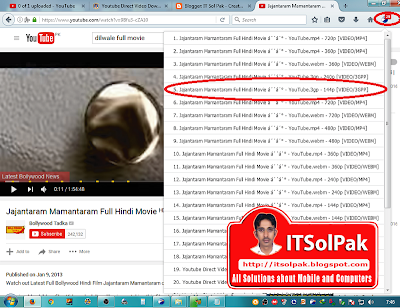
6:Top right corner eagle icon will be show.
7:Play movie form Youtube more than one extensions will be appear.
8:Select 144p for mobile or your desire and Download


Youtube Video Direct Download 

A lot of download manager are available for windows. But most of them not download videos from Youtube. Other main problem is registration expire after 30 days. Many cracks and keygens are there but not permanent . When  these connected with internet sent your fake data to own server and result fake serial or registration problem.
In this tutorial , I am telling you about a Download Manager witch is totally free and with this downloads video from Youtube easily. Let's start .

Eagle Get
Download EagleGet software from official website eagleget.com and install.
Copy youtube video link like this ......

Youtube Direct Video  Downloader

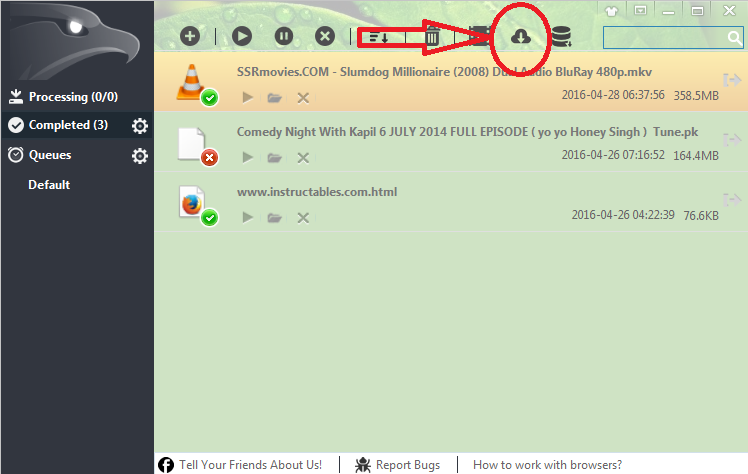
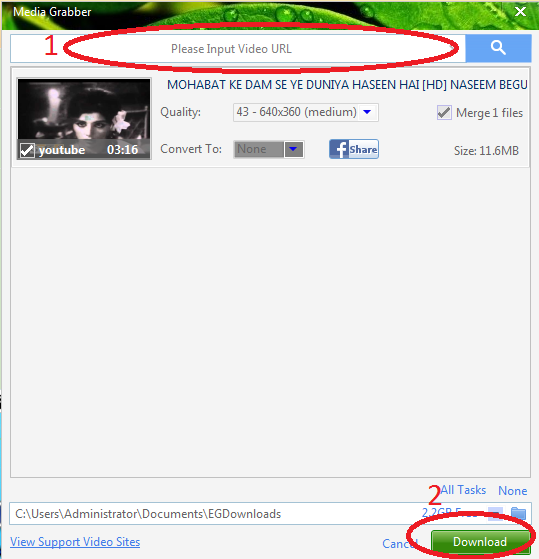
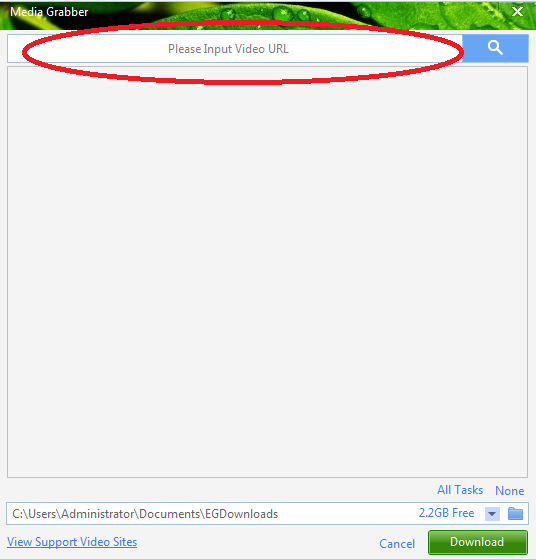
Open EagleGet and clock on Media Grabber option top of the window.

Youtube Direct Downloader

It will cottect your url automatically if not then paste url and search. And finally click Download.

Direct Video  Downloader

Youtube Direct Video  Download

Now you can see your started download on main window.

Q Mobile L7 read flash,write or format

Q Mobile L7 read flash

How to read,write and format Qmobile L7 SPD6531 ic. One thing always remember that all Spreadtrum mobiles android or simple have a boot key.Without pressing boot key phone does not boot in any device.
Read Spreadtrum not detect in Volcano and other devices.The process is very simple.
  1. Open GSM Aladdin Tool.
  2. Then Connect.
  3. Select Spreadtrum tab.
  4. In drop down menu select 6531 boot order.
  5. Finally select task whether you want read,write or format.
You have done
Caution:Never try to format without read flash as backup.
             
We all know importance of a forum with website.There are many ways for website but have anybody know for a blogger blog please reply must I am waiting.Read From Forum.

Video Tutorial on Our Youtube Channel