Tampilkan postingan dengan label Samsung Tool. Tampilkan semua postingan

Sabtu, 28 Oktober 2017

Samsung firmware files torrent download (Updated)

Samsung firmware files torrent download

Z3X Samsung Tool team allow downloading Samsung firmware from the server via torrent.


Samsung firmware files torrent download (Updated)

After adding to chrome Z3X extension icon will show in corner of the window. But pop up is empty. In bottom right corner click Update now. 


z3x box Samsung flash file free download

A list of all Samsung files and tool from the server will appear, click what you want.
Torrent file will download, you can download firmware by using BitTorrent or utorrent .

Samsung firmware files torrent


Rabu, 09 Agustus 2017

Octopus Box Samsung Software v.2.5.6


Octoplus / Octopus Box Samsung Software v.2.5.6 is out!
We have released new world's first Reset FRP method for Exynos CPU-based devices with UFS memory chips! No need to write combination versions of firmware, no need to root, all Android versions and security patch levels are supported!

Octoplus / Octopus Box Samsung Software v.2.5.6 Release Notes:

  • Added new world's first Reset FRP method for the following Exynos CPU-based devices with UFS memory chips:
    • SM-A810F, SM-A810FD, SM-A810S, SM-A810YZ
    • SM-G920A, SM-G920D, SM-G920K, SM-G920F, SM-G920S, SM-G920L, SM-G920I, SM-G920AZ, SM-G920FD, SM-G920FZ, SM-G920T, SM-G920W8
    • SM-G9250, SM-G925A, SM-G925F, SM-G925I, SM-G925K, SM-G925L, SM-G925S, SM-G925FQ, SM-G925T, SM-G925W8
    • SM-N9208, SM-N920A, SM-N920C, SM-N920F, SM-N920G, SM-N920I, SM-N920K, SM-N920L, SM-N920S, SM-N920CD, SM-N920T, SM-N920W8
    • SM-G928F, SM-G928I, SM-G928K, SM-G928L, SM-G928S, SM-G928T, SM-G928W8, SM-G9287, SM-G9287C, SM-G928G, SM-G928C, SM-G928N0
    • SM-G930F, SM-G930FD, SM-G930U, SM-G930S, SM-G930K, SM-G930L, SM-G930W8
    • SM-G935F, SM-G935FD, SM-G935J, SM-G935K, SM-G935L, SM-G935S, SM-G935U, SM-G935W8
    No need to write combination versions of firmware, no need root, all Android versions and security patch levels are supported!
    Reset FRP needs specific connection sequence using Micro USB and then Samsung Micro UART cable (with 525 kOhm resistor inside). To perform new Reset FRP operation do the following steps:
    1. Select mentioned above device model in Software's list
    2. Press «Reset FRP / Reactivation / EE» button
    3. Select second Reset FRP method (press «For devices with UFS memory chips» button)
    4. Put the phone into Download Mode (power off the phone, press and hold "Volume-" + "Home" + "Power ON" buttons) and connect USB cable
    5. When Software asks, disconnect USB cable and connect Samsung Micro UART cable
    6. Press and hold «Volume-» + «Power ON» keys during of 15-20 seconds, Software will automatically close wizard window and do reset FRP
    7. Done
    Note: this solution may also work for another (not mentioned above) Exynos CPU-based devices with UFS memory chips.
    You can try to perform new Reset FRP operation for un-supported device by selecting any model from the list above.
    Also note, that some revisions of mentioned above devices' can be with eMMC chip, not with USF (even the same model). If You are not sure, that your device has UFS (not eMMC) memory chip, just try to perform new Reset FRP operation and Software will automatically detect chip type.

  • All supported operations are described in details in the manual ("Cable & Manual" button in the software)
  • Download Octoplus / Octopus Box Samsung Software v.2.5.6

RIFF Box Firmware v1.45

RIFF Box Firmware v1.45, RIFF JTAG Manager v1.69 eMMC Plugin v3.02 released
—————————
– Added MassStorage Mode for RIFFBOX2
RIFF JTAG Manager v1.69
—————————
– Fixed the bug for General Purpose Partition Sizes
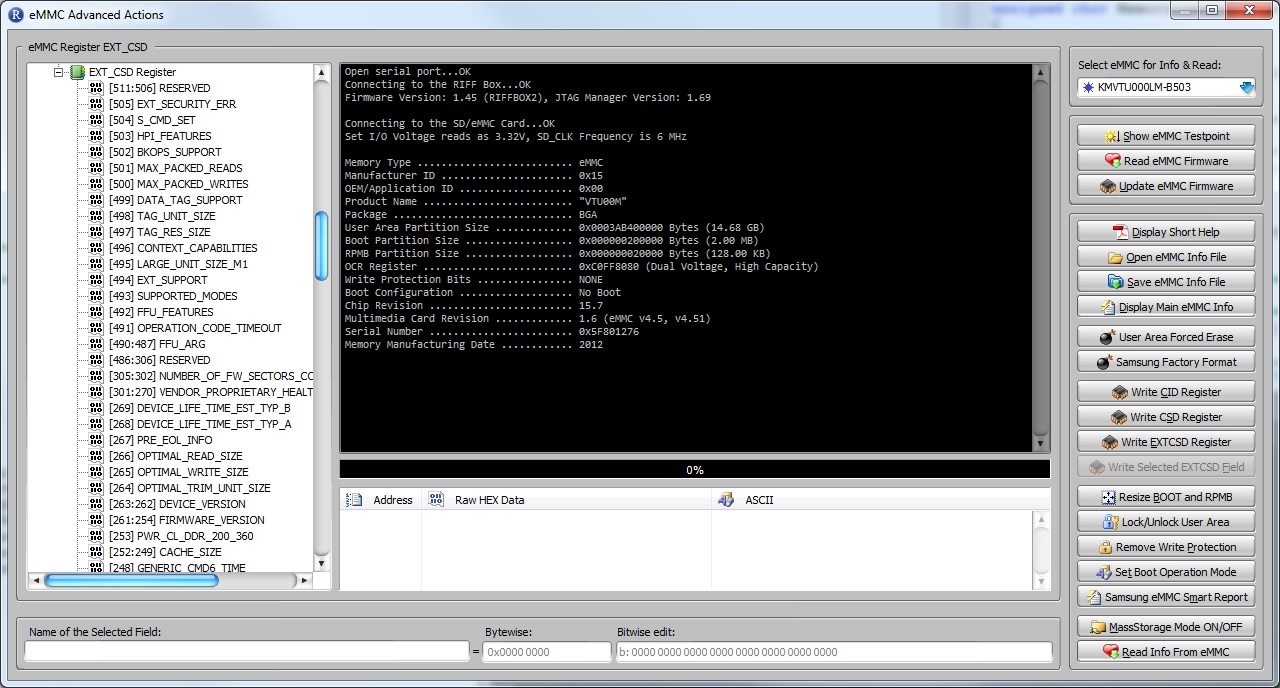
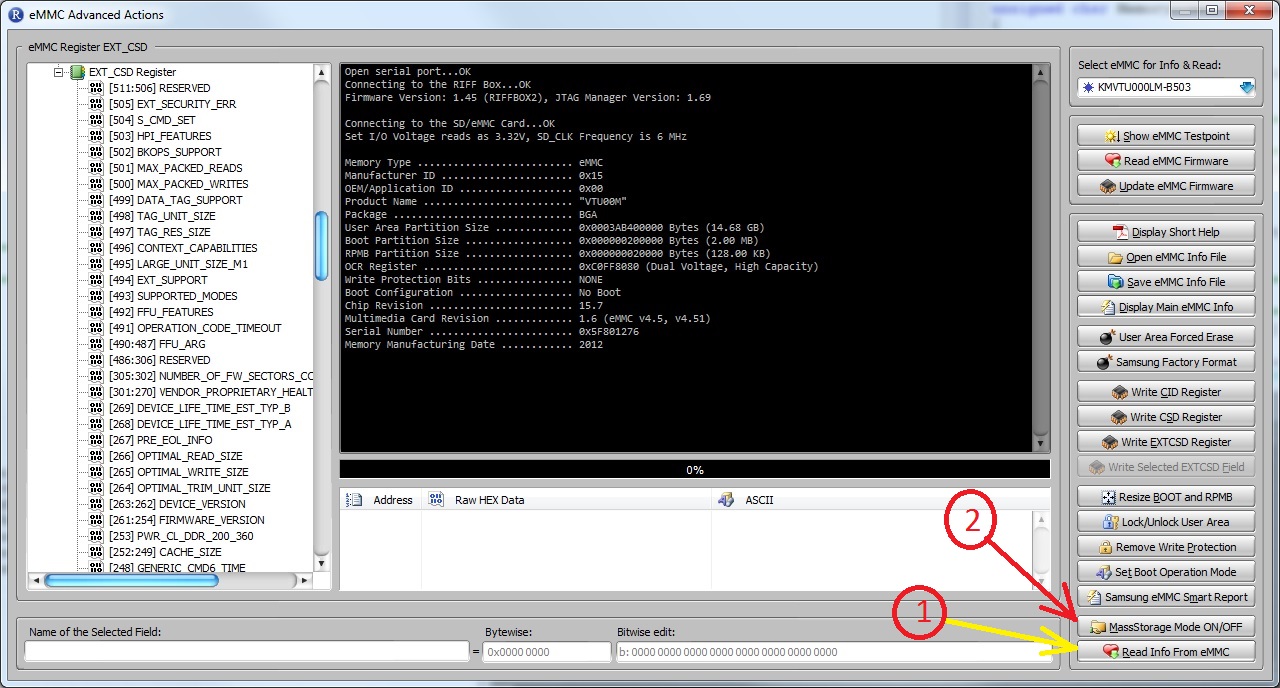
– Added feature to switch ON/OFF the MassStorage Mode. For this, please connect an eMMC (either via Direct or ISP interface),
make sure it is detected (on the “eMMC/SD Card” page), and on the ‘eMMC/SD Advanced’ dialog click the ‘MassStorage Mode ON/OFF’ button to setup which partitions are to be mounted.
Please note, for stable connection, first of all do reads on the “eMMC/SD Card” page to adjust stable Frequency, BusWidth and Voltage.
After you click “MassStorage Mode ON/OFF” button, current settings for Voltage, Frequency, Bus Width will be written into RIFFBOX non-volatile memory,
and while the MassStorage mode is ON, upon each connection to USB the RIFFBOX will additionally to normal Control interface enumerate the MassStorage Disks (as if a Flash Stick is connected to PC)
eMMC Partition Table FullFlash Image Files Processing Plugin (eMMCDiskPartitions.dll) v3.02
————————————-
– Added support for User Area Partition bounds selection from the JTAG Manager’s MassStorage settings dialog
– Added file system detection: the plugin analyzes the partition’s data structure to autodetect what file system (if any) is used. The result is displayed in the new “F/S” row
..
To mount EXT/x partitions You should install EXT FS driver from here:
http://www.ext2fsd.com
You can read more details at official support forum:
http://www.unlockforum.com/showthread.php/riff-box-firmware-v1-45-riff-jtag-manager-31615.html


To start working with RIFF JTAG Box, You’ll need to download initial setup:
RIFF Box JTAG Manager software setup
This will install following files to Your computer:
  • JTAG Manager software v1.67
  • RIFF Box control port driver
  • RIFF Box update port driver
  • RIFF DCC USBLoader driver
  • QUALCOMM QHUSB_DLOAD driver
  • NXP LPC Device USB driver
RIFF Box JTAG Manager v1.67
Contains JTAG Manager v1.67 and RIFF Box drivers. Just extract the archive to desired directory and start using it.
You may need to install following Microsoft software:
Visual C++ 2005 Redistributable Package for (X86)
Visual C++ 2005 Redistributable Packager for (x64)
After You execute setup, it will install all files to desired destination, and launch drivers installer script.
Take note, If You’re using Windows XP, You’ll have to provide drivers location to Hardware Installation Wizard after connecting devices for first time.
RIF Box –  Starting Up